How to Link Jan Aadhaar with SSO ID (Complete 2026 Guide)
Quick Summary: Why Link Jan Aadhaar?
- Verification: It acts as your digital KYC for all Rajasthan schemes.
- Auto-Fill: Data like your name, age, and address is automatically fetched for job forms.
- Mandatory: Required for SJE Scholarships, Palanhaar, and Ayushman Arogya Yojana.
How to Link Jan Aadhaar with SSO ID (Complete 2026 Guide)
If you want to access scholarships, pensions, or any government scheme in Rajasthan, simply having an SSO ID is not enough. Your SSO Profile must be linked with Jan Aadhaar. Without this link, the system cannot verify your eligibility, and your applications will likely be rejected.
In this guide, we will show you how to link or update your Jan Aadhaar in your SSO profile in just a few minutes.
What You Need Before Starting
- Your SSO ID and Password.
- Jan Aadhaar ID or Enrollment Number.
- Registered Mobile Number: The one linked to your Jan Aadhaar (to receive the OTP).
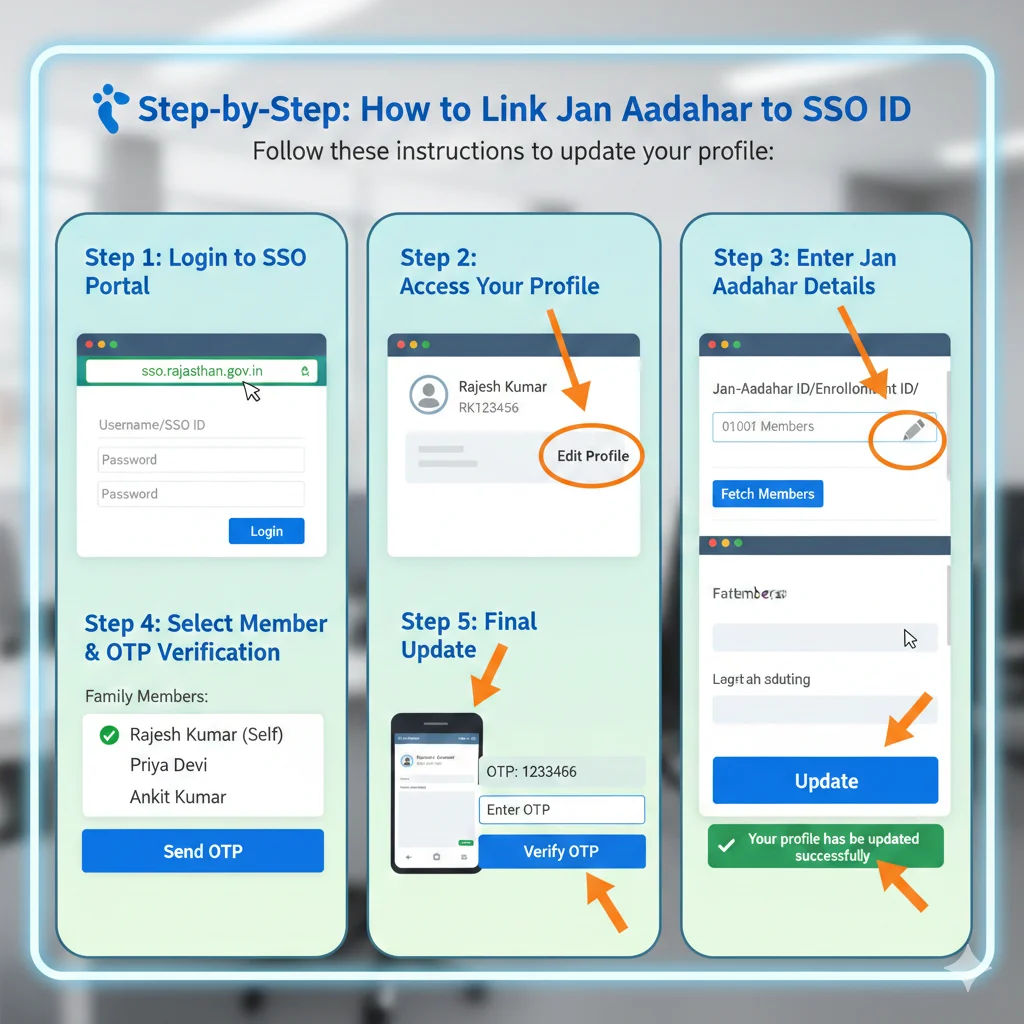
Step-by-Step: How to Link Jan Aadhaar to SSO ID
Follow these instructions to update your profile:
Step 1: Login to SSO Portal
Visit sso.rajasthan.gov.in and log in using your credentials.
Step 2: Access Your Profile
Once the dashboard opens, look at the top header. Click on the ‘Edit Profile’ (Pencil Icon) located next to your name/SSO ID.
Step 3: Enter Jan Aadhaar Details
Scroll down to find the field labeled “Jan-Aadhaar ID/Enrollment ID”. Click on the ‘Pencil/Edit’ icon next to this box.
- Enter your 10-digit Jan Aadhaar ID or the 15-digit Enrollment ID.
- Click on the ‘Fetch Members’ button.
Step 4: Select Member & OTP Verification
A list of all family members linked to that Jan Aadhaar will appear.
- Select your name from the list.
- Click on ‘Send OTP’.
- Enter the 6-digit OTP received on your mobile and click ‘Verify OTP’.
Step 5: Final Update
After successful verification, click the ‘Update’ button at the bottom of the profile page. You will see a confirmation message saying “Your profile has been updated successfully.”
Common Problems & Solutions
- “Jan Aadhaar already linked with another SSO ID”: This happens if you accidentally created two SSO IDs. You must log in to the old ID and “De-link” it, or contact the SSO helpdesk to merge the IDs.
- “Mobile Number Not Mapped”: If you don’t receive an OTP, it means your mobile number is not updated in the Jan Aadhaar portal. You must visit a nearby e-Mitra to update your Jan Aadhaar first.
- “Data Mismatch”: If your name in SSO doesn’t match Jan Aadhaar, the link might fail. Always ensure your basic details are identical across all government documents.
Frequently Asked Questions (FAQ)
Q1. Kya Jan Aadhaar link karna free hai?
Ans: Haan, ye process puri tarah se Free hai aur aap ise khud apne mobile se kar sakte hain.
Q2. Kya link karne ke baad details change kar sakte hain?
Ans: Link hone ke baad, aapka naam, DOB, aur Gender Jan Aadhaar se sync ho jata hai. Inhe change karne ke liye aapko pehle Jan Aadhaar update karna hoga.
Q3. Scholarship ke liye ye kyun zaroori hai?
Ans: Scholarship portal aapki category (SC/ST/OBC) aur income details Jan Aadhaar se hi verify karta hai.
Next Steps for You:
- Check Your Services: Top 100+ Services Available via SSO ID
- Explore Benefits: Why Every Citizen Must Have an SSO ID
- Master Resource: Back to Ultimate Rajasthan SSO Portal Guide
Disclaimer – This website is not run by the government. It is an independent site that aims to provide information about SSO Portal Rajasthan to the public in easy language.